
Object to relational mapping follows fixed rules: a class becomes a table, an object a row, a one-to-many association a foreign key on the many side, and a many-to-many association (or an association class) a junction table.
Objectives
Do not copy. Read for understanding and the viva- Complete questions 23 to 23 of the manual: mapping classes to database tables
- Prepare the deliverable before the lab and finish it during the session
- Be ready to explain every step in the viva
Questions Covered
Do not copy. Read for understanding and the viva| Question | Requirement | Status |
|---|---|---|
| Q23 | Do mapping of the following Classes into database tables | Complete |
Preparation
Do not copy. Read for understanding and the viva- The manual asks for a problem description of 300 to 500 words and a list of assumptions before every diagram. Write both first; they fix the scope the evaluator marks you against.
- Write the mapping rule you apply next to each table: class to table, attribute to column, association to foreign key or junction table.
- Give every table a primary key, and write the
CREATE TABLEstatements with foreign key constraints so the mapping is checkable.
Question 23
Problem Statement
Write in lab recordDo mapping of the following Classes into database tables
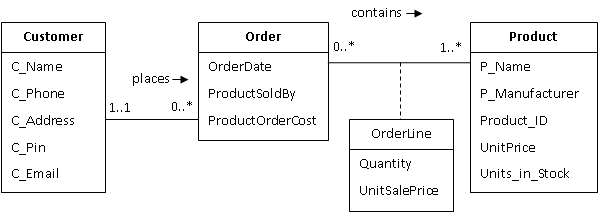
Figure 1.18: Customer Order Association Class
Solution
Write in lab recordAssumptions
The shop of Session 8, Question 20 now needs its data in a relational database so that orders survive after the program exits and can be queried by report tools. The figure has three classes and one association class. A customer places any number of orders and every order belongs to exactly one customer. An order contains one or more products, a product may appear in many orders, and the quantity and unit sale price of each (order, product) pair are stored on the OrderLine association class. The database must keep the same facts with the same names, enforce that an order cannot refer to a customer who does not exist, that an order line cannot refer to a missing order or product, that the same product is not listed twice on one order, and that a quantity is positive. It must also support one query that walks the whole figure from customer to product.
- Target is MySQL 8. Types are chosen because the figure gives none:
VARCHARfor text,CHAR(6)for the PIN,DECIMAL(10, 2)for money,DATEfor the order date,INTfor counts and IDs. - Customer and Order have no identifying attribute in the figure, so each gets a surrogate
AUTO_INCREMENTkey. Product already hasProduct_ID, which becomes its primary key. Orderis a reserved word in SQL, so the table isOrders; column names keep the figure’s spelling.C_Emailis unique per customer.ProductOrderCostis kept as a column because the figure shows it as an attribute, even though it can be derived from the lines.- Deleting an order deletes its lines (
ON DELETE CASCADE); deleting a product or customer that is still referenced is refused (the defaultRESTRICT).
Mapping rules
| Rule | Applies to | Result |
|---|---|---|
| 1. Class to table, attribute to column, one primary key per table | Customer, Product, Order | Customer(customer_id PK, C_Name, C_Phone, C_Address, C_Pin, C_Email); Product(Product_ID PK, P_Name, P_Manufacturer, UnitPrice, Units_in_Stock); Orders(order_id PK, OrderDate, ProductSoldBy, ProductOrderCost) |
| 2. One-to-many association: foreign key on the many side | places, Customer 1..1 to 0..* Order | Orders.customer_id references Customer.customer_id, NOT NULL because the lower bound at Customer is 1 |
| 3. Many-to-many association: junction table keyed by both foreign keys | contains, Order 0..* to 1..* Product | OrderLine(order_id, Product_ID) with primary key on the pair |
| 4. Association class: its attributes become columns of the junction table | OrderLine with Quantity, UnitSalePrice | OrderLine.Quantity, OrderLine.UnitSalePrice |
5. Multiplicity lower bounds become NOT NULL or CHECK constraints | 1..1 at Customer, positive quantity | customer_id NOT NULL, CHECK (Quantity > 0) |
| 6. Object identity that the figure does not name becomes a surrogate key | Customer, Order | customer_id, order_id with AUTO_INCREMENT |
Resulting schema, one line per table (PK underlined in a hand drawing, FK marked):
Customer  (customer_id PK, C_Name, C_Phone, C_Address, C_Pin, C_Email)
Product   (Product_ID PK, P_Name, P_Manufacturer, UnitPrice, Units_in_Stock)
Orders    (order_id PK, OrderDate, ProductSoldBy, ProductOrderCost, customer_id FK -> Customer)
OrderLine (order_id FK -> Orders, Product_ID FK -> Product, Quantity, UnitSalePrice)
           PK = (order_id, Product_ID)
Foreign keys drawn as arrows from the referencing column to the referenced key:
 +-------------+        +----------------------+        +-------------------+
 |  Customer   |        |       Orders         |        |     Product       |
 |-------------|        |----------------------|        |-------------------|
 | customer_id |<-------| customer_id  (FK)    |        | Product_ID (PK)   |
 | C_Name      |  1..1  | order_id     (PK)    |        | P_Name            |
 | C_Phone     |        | OrderDate            |        | P_Manufacturer    |
 | C_Address   |        | ProductSoldBy        |        | UnitPrice         |
 | C_Pin       |        | ProductOrderCost     |        | Units_in_Stock    |
 | C_Email     |        +----------------------+        +-------------------+
 +-------------+                 ^                               ^
                                 | 0..*                          | 1..*
                        +--------+-------------------------------+--------+
                        |                  OrderLine                      |
                        |-------------------------------------------------|
                        | order_id (FK, PK part)   Product_ID (FK, PK part)|
                        | Quantity                 UnitSalePrice           |
                        +-------------------------------------------------+
The same four tables as PlantUML, for a rendered copy of the schema:
@startuml
hide circle
skinparam linetype ortho

entity "Customer" as customer {
  * customer_id : INT <<PK>>
  --
  C_Name : VARCHAR(100)
  C_Phone : VARCHAR(15)
  C_Address : VARCHAR(200)
  C_Pin : CHAR(6)
  C_Email : VARCHAR(100)
}

entity "Orders" as orders {
  * order_id : INT <<PK>>
  --
  OrderDate : DATE
  ProductSoldBy : VARCHAR(100)
  ProductOrderCost : DECIMAL(10,2)
  customer_id : INT <<FK>>
}

entity "Product" as product {
  * Product_ID : INT <<PK>>
  --
  P_Name : VARCHAR(100)
  P_Manufacturer : VARCHAR(100)
  UnitPrice : DECIMAL(10,2)
  Units_in_Stock : INT
}

entity "OrderLine" as orderline {
  * order_id : INT <<PK, FK>>
  * Product_ID : INT <<PK, FK>>
  --
  Quantity : INT
  UnitSalePrice : DECIMAL(10,2)
}

customer ||--o{ orders : places
orders ||--|{ orderline : has lines
product ||--o{ orderline : appears in
@enduml
How the objects of Session 8, Question 20 become rows. One object is one row; one link is one foreign key value; one OrderLine object is one row of the junction table:
| Object in the C++ program | Table | Row |
|---|---|---|
asha (Customer) | Customer | 1, Asha, 9876543210, 12 MG Road Jaipur, 302001, asha@example.com |
pen, notebook, stapler (Product) | Product | 101, Pen, Cello, 10.00, 500 and two more rows |
o1 placed by asha | Orders | 1, 2026-09-01, Store counter, 415.00, customer_id = 1 |
o2 placed by asha | Orders | 2, 2026-09-15, Online, 230.00, customer_id = 1 |
OrderLine o1 to pen, 20 at 9.50 | OrderLine | 1, 101, 20, 9.50 |
OrderLine o1 to notebook, 5 at 45.00 | OrderLine | 1, 102, 5, 45.00 |
OrderLine o2 to stapler, 2 at 115.00 | OrderLine | 2, 103, 2, 115.00 |
pointer o1.customer | Orders.customer_id | the value 1, not a separate row |
vector asha.orders | none | recovered by SELECT ... FROM Orders WHERE customer_id = 1; the database stores the link once, on the many side |
Steps
- Save the listing below as
customer_order.sqlin asession-10folder. - Start MySQL and run
mysql -u root -p < customer_order.sql. The script creates the database, the four tables, the sample rows and runs the join. - To see the tables in the MySQL shell:
USE customer_order; SHOW TABLES; DESCRIBE OrderLine;. - Paste the result of the final
SELECTinto the record.
SQL
-- customer_order.sql -- MCSL-222 Session 10, Q23
-- Figure 1.18 (Customer, Order, Product, OrderLine) mapped to MySQL tables.
-- Run: mysql -u root -p < customer_order.sql

DROP DATABASE IF EXISTS customer_order;
CREATE DATABASE customer_order;
USE customer_order;

-- Rule 1: class -> table, attribute -> column, one surrogate primary key per table.
CREATE TABLE Customer (
    customer_id  INT AUTO_INCREMENT PRIMARY KEY,
    C_Name       VARCHAR(100) NOT NULL,
    C_Phone      VARCHAR(15),
    C_Address    VARCHAR(200),
    C_Pin        CHAR(6),
    C_Email      VARCHAR(100) UNIQUE
);

-- Product_ID already identifies a product in the figure, so it is the key.
CREATE TABLE Product (
    Product_ID      INT PRIMARY KEY,
    P_Name          VARCHAR(100) NOT NULL,
    P_Manufacturer  VARCHAR(100),
    UnitPrice       DECIMAL(10, 2) NOT NULL,
    Units_in_Stock  INT NOT NULL DEFAULT 0
);

-- Rule 2: one-to-many (Customer 1..1 places 0..* Order) -> foreign key on the
-- many side. NOT NULL because the multiplicity at Customer is exactly 1.
-- "Order" is a reserved word in SQL, so the table is named Orders.
CREATE TABLE Orders (
    order_id          INT AUTO_INCREMENT PRIMARY KEY,
    OrderDate         DATE NOT NULL,
    ProductSoldBy     VARCHAR(100),
    ProductOrderCost  DECIMAL(10, 2),
    customer_id       INT NOT NULL,
    FOREIGN KEY (customer_id) REFERENCES Customer (customer_id)
);

-- Rule 3: many-to-many with an association class (Order 0..* contains 1..*
-- Product, OrderLine) -> junction table whose primary key is the pair of
-- foreign keys, plus the association-class attributes as columns.
CREATE TABLE OrderLine (
    order_id       INT NOT NULL,
    Product_ID     INT NOT NULL,
    Quantity       INT NOT NULL CHECK (Quantity > 0),
    UnitSalePrice  DECIMAL(10, 2) NOT NULL,
    PRIMARY KEY (order_id, Product_ID),
    FOREIGN KEY (order_id)   REFERENCES Orders (order_id) ON DELETE CASCADE,
    FOREIGN KEY (Product_ID) REFERENCES Product (Product_ID)
);

-- Sample rows (same data as the C++ program of Session 8, Q20)
INSERT INTO Customer (C_Name, C_Phone, C_Address, C_Pin, C_Email) VALUES
    ('Asha', '9876543210', '12 MG Road, Jaipur', '302001', 'asha@example.com'),
    ('Ravi', '9123456780', '4 FC Road, Pune',    '411004', 'ravi@example.com');

INSERT INTO Product (Product_ID, P_Name, P_Manufacturer, UnitPrice, Units_in_Stock) VALUES
    (101, 'Pen',      'Cello',     10.00, 500),
    (102, 'Notebook', 'Classmate', 45.00,  40),
    (103, 'Stapler',  'Kangaro',  120.00,   3);

INSERT INTO Orders (OrderDate, ProductSoldBy, ProductOrderCost, customer_id) VALUES
    ('2026-09-01', 'Store counter', 415.00, 1),
    ('2026-09-15', 'Online',        230.00, 1),
    ('2026-09-20', 'Online',         90.00, 2);

INSERT INTO OrderLine (order_id, Product_ID, Quantity, UnitSalePrice) VALUES
    (1, 101, 20,   9.50),
    (1, 102,  5,  45.00),
    (2, 103,  2, 115.00),
    (3, 102,  2,  45.00);

-- Walk the whole figure: Customer -> Orders -> OrderLine -> Product
SELECT c.C_Name,
       o.order_id,
       o.OrderDate,
       p.P_Name,
       ol.Quantity,
       ol.UnitSalePrice,
       ol.Quantity * ol.UnitSalePrice AS line_total
FROM Customer c
JOIN Orders    o  ON o.customer_id = c.customer_id
JOIN OrderLine ol ON ol.order_id   = o.order_id
JOIN Product   p  ON p.Product_ID  = ol.Product_ID
ORDER BY o.order_id, p.Product_ID;

-- Check that the stored ProductOrderCost agrees with the sum of its lines
SELECT o.order_id,
       o.ProductOrderCost,
       SUM(ol.Quantity * ol.UnitSalePrice) AS computed_cost
FROM Orders o
JOIN OrderLine ol ON ol.order_id = o.order_id
GROUP BY o.order_id, o.ProductOrderCost
ORDER BY o.order_id;
Output
No MySQL server is installed on the machine used to prepare this page, so the script was run through SQLite 3 with PRAGMA foreign_keys = ON after replacing INT AUTO_INCREMENT PRIMARY KEY by INTEGER PRIMARY KEY and dropping the CREATE DATABASE and USE lines. Every CREATE TABLE, INSERT and the join ran without error and produced these rows; MySQL prints the same rows with 9.50 and 45.00 formatting because the columns are DECIMAL.
C_Name  order_id  OrderDate   P_Name    Quantity  UnitSalePrice  line_total
------  --------  ----------  --------  --------  -------------  ----------
Asha    1         2026-09-01  Pen       20        9.5            190.0
Asha    1         2026-09-01  Notebook  5         45             225
Asha    2         2026-09-15  Stapler   2         115            230
Ravi    3         2026-09-20  Notebook  2         45             90
Two statements were then run on purpose to show the constraints working:
INSERT INTO Orders (OrderDate, customer_id) VALUES ('2026-09-21', 99);
Error: FOREIGN KEY constraint failed

INSERT INTO OrderLine VALUES (1, 101, 3, 9.50);
Error: UNIQUE constraint failed: OrderLine.order_id, OrderLine.Product_ID
The first fails because customer 99 does not exist (rule 2). The second fails because order 1 already has a line for product 101 (rule 3: the pair is the primary key).
The last query in the script checks the stored ProductOrderCost against the sum of its lines; all three orders agree:
order_id  ProductOrderCost  computed_cost
--------  ----------------  -------------
1         415               415.0
2         230               230
3         90                90
Explanation
| Diagram element | Where it is in the SQL |
|---|---|
| Class Customer with five attributes | CREATE TABLE Customer with five columns plus the surrogate customer_id. |
| Class Product | CREATE TABLE Product; Product_ID INT PRIMARY KEY because the figure already names an identifier. |
| Class Order | CREATE TABLE Orders (renamed to avoid the reserved word) with OrderDate, ProductSoldBy, ProductOrderCost. |
| places, 1..1 to 0..* | customer_id INT NOT NULL plus FOREIGN KEY (customer_id) REFERENCES Customer (customer_id) in Orders. The many side carries the key; NOT NULL is the 1..1. |
| contains, 0..* to 1..* | CREATE TABLE OrderLine with two foreign keys, one to Orders and one to Product. |
| Association class OrderLine | The same junction table carries Quantity and UnitSalePrice. PRIMARY KEY (order_id, Product_ID) means one line per pair, exactly one object per link in the figure. |
| Lower bound 1..* at Product | Cannot be written as a table constraint in MySQL; the application inserts at least one line per order. State this in the viva when asked. |
| Whole figure in one query | The SELECT joins Customer to Orders on customer_id, Orders to OrderLine on order_id, and OrderLine to Product on Product_ID; Quantity * UnitSalePrice is the line total. |
| Derived attribute ProductOrderCost | Stored as a column because the figure lists it; the GROUP BY query at the end of the script recomputes it from OrderLine so the two can be compared. |
Viva Questions
Do not copy. Read for understanding and the vivaQ: Which side of a one-to-many association gets the foreign key, and why? A: The many side. A row can hold one foreign key value, so the row that belongs to exactly one parent (Orders) stores the parent’s key. Storing order ids in Customer would need a list in one column.
Q: How is a many-to-many association mapped? A: As a junction table with one foreign key to each side and a primary key on the pair. OrderLine is that table.
Q: Where do the attributes of an association class go? A: Into the junction table, because they belong to the link, not to either end. Quantity and UnitSalePrice are columns of OrderLine.
Q: Why does Product keep Product_ID as its key while Customer gets a new customer_id? A: The figure names an identifier for Product only. The other classes rely on object identity, which the database has to replace with a surrogate key.
Q: What does NOT NULL on Orders.customer_id correspond to in the figure? A: The lower bound 1 of 1..1 at Customer: every order must have a customer.
Q: Why DECIMAL(10, 2) and not FLOAT for prices? A: DECIMAL stores exact rupees and paise; FLOAT rounds, so totals drift.
Q: What happens when a customer with orders is deleted? A: The default RESTRICT on the foreign key refuses the delete. Deleting an order removes its lines through ON DELETE CASCADE.
Q: Can the database enforce that an order has at least one product? A: Not with a plain constraint, because the order row is inserted before any line. It is checked by the application or a trigger.
Common Mistakes
Do not copy. Read for understanding and the viva- Naming the table
Order; it is a reserved word and theCREATE TABLEfails. - Putting the foreign key on the one side (an
order_idcolumn inCustomer), which allows only one order per customer. - Giving
OrderLineits ownline_idkey and forgetting the unique pair, so the same product can be listed twice on one order. - Leaving
customer_idnullable, which drops the1..1multiplicity. - Writing the
CREATE TABLEstatements in the wrong order, so a foreign key refers to a table that does not exist yet; parents first,OrderLinelast. - Forgetting the
INSERTrows and the join query; the mapping is only shown to work when a query crosses every foreign key.
Session Summary
Write in lab record- Question 23: mapping-rule table for figure 1.18 and
customer_order.sqlwithCREATE TABLEfor Customer, Product, Orders and OrderLine, primary and foreign keys, sample rows, and a four-table join with its output - Problem description and assumptions for the figure, plus the constraint checks that fail on purpose