
Indira Gandhi National Open University
Master of Computer Applications (MCA)
MCSL-222: Object Oriented Analysis and Design and Web Technologies Lab
Section 1: Object Oriented Analysis and Design
Instructions
- Prepare a draft solution for every exercise before the session and implement it during the designated lab session.
- For each exercise, write the problem description in about 300 to 500 words and list the basic assumptions. This limits the scope of your solution and helps the evaluator.
- Draw diagrams with a UML tool (StarUML, ArgoUML or equivalent). Name every class, actor, message and state.
- Sessions 8 to 10 may be implemented in C++, Java, Rust, Python or JavaScript; the class diagrams in the figures are the specification.
Session 1: Class and object diagrams
Q1. Draw Class Diagram for Online Shopping System (First, list the assumptions of the shopping system and then identify classes, and then draw the diagram).
Q2. Draw Class Diagram for Online Examination System.
Q3. Draw Object Diagram for Online Banking System.
Session 2: Use case diagrams
Q4. Draw Use Case Diagram for Online Shopping System.
Q5. Draw Use Case Diagram for Library Management System.
Session 3: Sequence diagrams
Q6. Draw Sequence Diagram for Online Shopping System.
Q7. Draw Sequence Diagram for Online Examination System.
Q8. Draw a Sequence diagram for Employee Management System.
Session 4: Collaboration (communication) diagrams
Q9. Draw Collaboration Diagram for Student Registration Process in Masters Program of a University.
Q10. Draw Collaboration Diagram for Online Banking System.
Q11. Draw a Collaboration diagram for Employee Management System.
Session 5: Activity diagrams
Q12. Activity Diagram Online Banking System.
Q13. Draw Activity Diagram for Online Examination System.
Session 6: State chart diagrams
Q14. State Chart Diagram for Online Examination System.
Q15. State Chart Diagram for Online Fund Transfer through Netbanking Banking System.
Session 7: Component and deployment diagrams
Q16. Draw Component Diagram for Online Examination System.
Q17. Draw Component Diagram for Order Processing Application.
Q18. Diagram Deployment Diagram for Online Student Admission System.
Session 8: Implementing class diagrams in code
Q19. Implement the following Class Diagram in C++/Java.
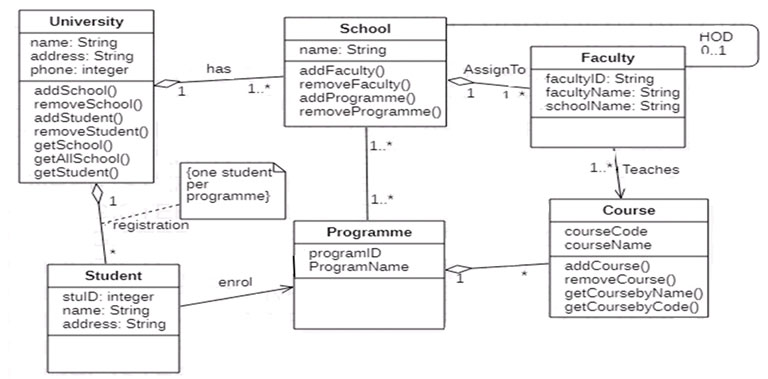
Figure 1.15: Class Diagram for Student Registration
Q20. Implement the Class Diagram of figure 1.18, in C++ or Java.
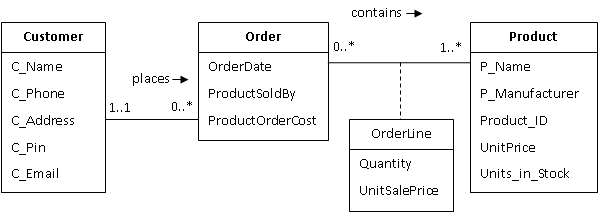
Figure 1.18: Customer Order Association Class
Session 9: Implementing associations
Q21. Implement the following Associations using C++/Java.
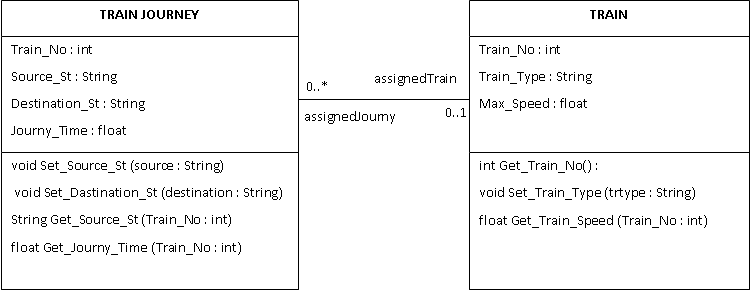
Figure 1.16: Train-Journey Association
Q22. Implement the following Associations using C++/Java.
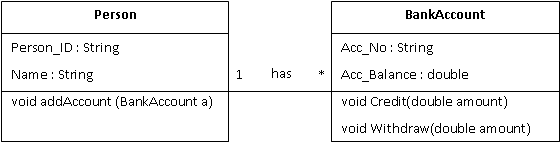
Figure 1.17: Person and Bank Account
Session 10: Mapping classes to database tables
Q23. Do mapping of the following Classes into database tables
Figure 1.18: Customer Order Association Class